
Connect to Pocket CTF
1. Join the assigned Wi-Fi network
On a board with a display, first select and confirm a track or Documentation using its buttons. Headless boards start Documentation automatically.
Choose PocketCTF-XXXX, where the final four characters match your assigned board ID. The name stays the same when switching tracks.
Wi-Fi password: pocketctf
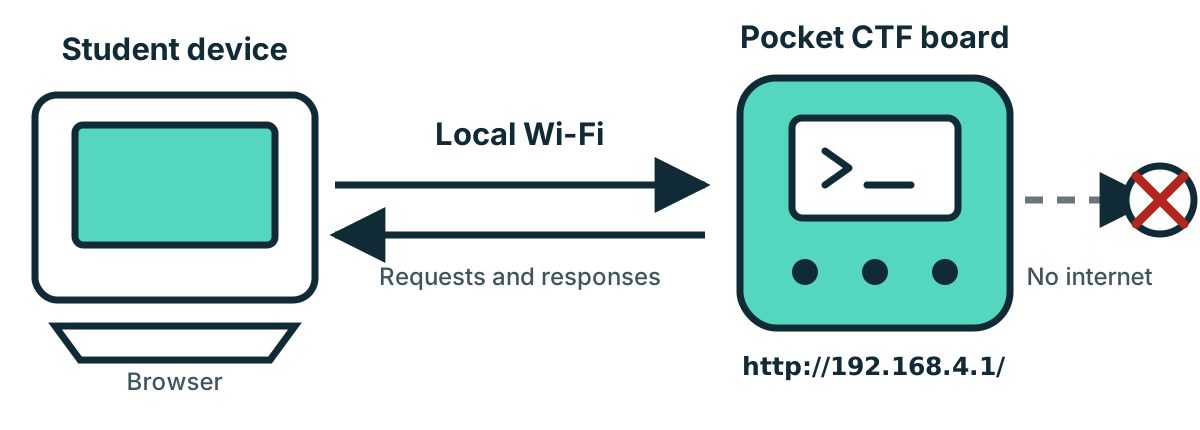
Your device will report no internet. That is expected—choose stay connected or use without internet.
2. Open the game
Enter this exact address in a normal browser tab:
http://192.168.4.1/Use http, not https. In Documentation, open Choose a track and start your assigned track. Stay on the same Wi-Fi network while the board restarts.
Reference opens offline help without ending play; Device home returns. Switch track requires confirmation and clears progress. Reset opens Documentation on headless boards or the physical menu on display boards.
For USB activities, use the student mpremote setup guide. Default example ports: Linux /dev/ttyACM0, Windows COM5. Confirm your actual port with mpremote devs.
Protect your progress
- Keep using the same browser profile; private windows have separate sessions.
- Do not clear site data or restart the board during play.
- Avoid many browser profiles: the board keeps at most four active sessions.
- Copy flags or seals carefully. 25 incorrect flag submissions block further flag submissions for that session. Ask the instructor for help.
- Use tools only against your assigned Pocket CTF device. Do not brute-force, scan, or flood the board.
Quick fixes
| Problem | What to do |
|---|---|
| No Pocket CTF Wi-Fi | Check power, refresh networks, then ask the instructor. |
| Device changes networks | Choose “stay connected”; pause automatic switching only with instructor approval. |
| Page will not open | Recheck Wi-Fi and enter http://192.168.4.1/ exactly. |
| Server error page | Reload once in the same tab. If it repeats, stop and ask the instructor; do not create extra sessions. |
| Wrong track appears | Disconnect and match the network's four-character suffix. |
| Progress disappeared | Return to the original browser profile and tell the instructor before resetting anything. |
| Game becomes slow | Stop repeated requests or scripts, wait, and reload once. |