Encoded Telemetry
A status API carries a diagnostic payload in a transport-friendly form. Identify the representation and recover the original text.
Objective
- Read an API response and decode the field according to its metadata.
- Explain why reversible encoding is not encryption.
Before you begin
Open /challenge/encoding, then review the Base64 recipe.
Concepts
Base64 represents bytes with printable characters. It uses no secret key and provides neither confidentiality nor authenticity.
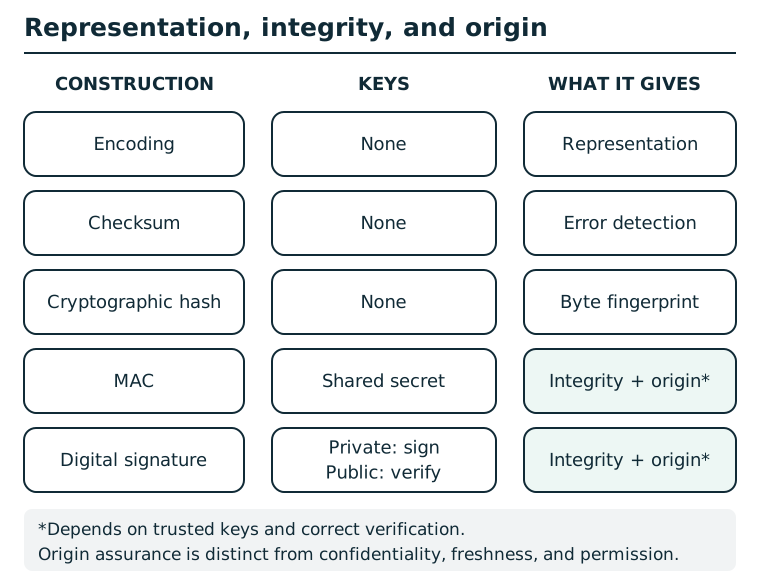
Encoding is reversible. Checksums detect accidental errors. Hashes fingerprint bytes but do not authenticate a source. A MAC provides integrity and origin within a group that shares a secret; any member can create tags. A signature binds bytes to a private-key holder when verification and public-key trust are correct. None of these alone encrypts, proves freshness, or grants authorization.
Suggested tools
- Base64 decoder: Python, a command-line decoder, or an offline accessible decoder; copy only the encoded field value.
Tool practice
Rehearse the worked tool exercise before using challenge data.
Run the Base64 round trip with the practice word first. In the API JSON, copy the diagnostic string value only. Decode locally, and use repr or a hex view if the output has invisible trailing characters. A decoder error is not evidence of encryption.
Investigation
Observe
Read every field returned by /api/status, including the field that names the encoding and the diagnostic payload.
Form a hypothesis
What transformation reverses the payload without a password or key?
Test carefully
Decode the payload value, not its JSON quotes, key name, or punctuation.
Progressive hints
Hint 1
The API tells you which encoding it used.
Hint 2
Copy only diagnostic_payload.
Hint 3
Decode that value once as Base64.
Troubleshooting and reset
Remove surrounding quotes and restore padding if your tool requires it. This read-only module needs no reset.