The Lawsuit Filing
A civil filing displays black bars over sensitive names. Determine whether the document package still contains information that defeats the visible redaction.
Objective
By completing this module, you will be able to:
- distinguish visual covering from removal of document data; and
- enumerate and inspect files embedded inside a PDF.
Before you begin
Download the filing. Review PDF metadata and attachments. Extract files only from this authorized exercise document.
Concepts
A PDF can contain text, annotations, layers, and embedded files that are not obvious on the rendered page. Drawing a dark shape over content does not remove underlying text or attachments. Email headers can expose identities and message relationships even when the message body is omitted.
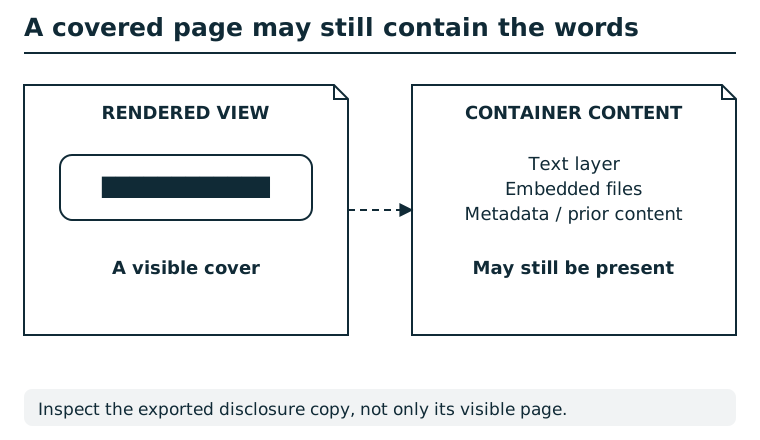
A visual overlay changes what a page looks like without necessarily removing underlying text, embedded files, metadata, or earlier versions. Work on a disclosure copy, remove sensitive content at the relevant layers, and inspect both the rendered result and the exported container. Keep the original evidence separately under the appropriate access controls.
Suggested tools
- PDF attachment viewer:
pdfdetach -list FILE.pdflists embedded files; many desktop readers expose the same information in an attachments panel. - Text editor: Inspect an extracted email as plain text, preserving headers.
Tool practice
Rehearse the worked tool exercise before using challenge data.
List PDF attachments first, note the index, and extract the selected message into a new local filename. Open it as plain text. Count the PDF attachment and message-level attachment separately; preserve mail header labels with their values.
Investigation
Observe
Read the visible filing, then inventory its embedded files. For an attached message, separate the embedded filename, mail headers, and any attachments reported inside that message.
Form a hypothesis
Which message header directly undermines the source redaction? What supporting facts demonstrate the depth of the overlooked attachment chain?
Test carefully
Extract the embedded message to a working directory and inspect it as text. Submit individual values from the attachment inventory and headers; do not run or open embedded content with an application that could execute it.
Progressive hints
The in-app nudge is: “Compare what the PDF displays with the information retained inside the file.” The guidance below offers further help when needed.
Hint 1
The rendered page is only one part of the PDF package.
Hint 2
List embedded attachments, then extract the message and read its header block.
Hint 3
The story-critical finding is the sender shown by the message's From header.
Troubleshooting and reset
If your PDF viewer has no attachment panel, save the file and use a PDF utility. If extracted content opens as an email message, a plain-text editor is enough; no mail account is required. Use a fresh browser session if the review was already closed.