The Pitch PDF
A freelance pitch looks ordinary when opened as a page. Review the document properties to determine what its creation history reveals.
Objective
By completing this module, you will be able to:
- distinguish PDF author, creator, and producer metadata; and
- assess when a software identifier creates an organizational link.
Before you begin
Download the PDF from the station. Review PDF metadata and attachments.
Concepts
PDFs commonly record an author, the application that created the source document, and the software that produced the final PDF. These fields describe different stages and may survive forwarding or renaming.
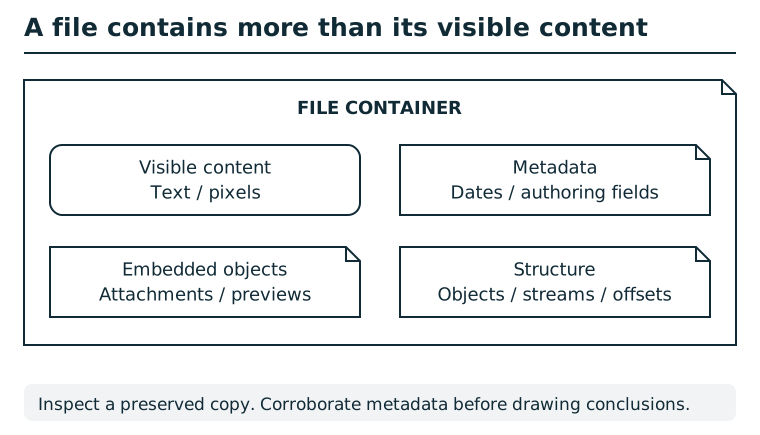
A file container can hold visible text or pixels, metadata, embedded objects, and structural information. A rendered view exposes only part of that content. Compare appropriate views of a preserved copy and record where each observation came from. Metadata may be stale or edited; corroborate it before attributing an action or identity.
Suggested tools
- PDF metadata viewer:
pdfinfo pitch.pdfdisplays standard properties. - General metadata viewer:
exiftool pitch.pdfcan confirm and expand the result. A graphical document-properties dialog is an alternative.
Tool practice
Rehearse the worked tool exercise before using challenge data.
Run pdfinfo on the downloaded PDF and put Author, Creator, and Producer on separate rows. Compare exiftool output if available, retaining labels. Do not infer a missing field from a browser panel that does not display it.
Investigation
Observe
Inventory the title, author, creator, producer, and timestamps. Keep each field paired with its value instead of treating all software names as equivalent.
Form a hypothesis
Which field most strongly associates the document with an organization or managed environment? Which fields merely identify a person or common editor?
Test carefully
Submit one metadata value at a time to the station. Start with the field that provides the strongest organizational link, then continue with supporting findings if time permits.
Progressive hints
Hint 1
Do not stop after reading the visible document or its filename.
Hint 2
Compare the Author, Creator, and Producer lines from a PDF metadata tool.
Hint 3
The producer value is the strongest clue about the environment that generated the file.
Troubleshooting and reset
If a browser viewer hides document properties, save the PDF and inspect the downloaded file. Preserve spaces and version numbers when submitting a metadata value. Starting a fresh browser session resets only your session progress.